Executive Summary
A hospital chaplaincy team was tracking spiritual care patients in Epic, the hospital EHR, but Epic was silently deleting scheduled appointments without any notification. Patients were falling through the cracks. The team needed a lightweight companion system to manage their own workflow, independent of Epic.
The challenge: hospital Windows PCs are locked down (no software installs), the team is small, there is no IT budget for a server, and coordinators already lived in Excel. The solution needed to work on day one with no admin rights, no setup, and no ongoing maintenance.
This case study covers the product decisions, constraint-driven architecture, and dual-deployment strategy behind a fully featured patient tracker shipped as both a native desktop app and a standalone Excel workbook.
Background & Problem
The hospital's Spiritual Care department has a small team of Ambulatory Scheduling Coordinators who receive patient referrals, book spiritual care consultations, and track patients through a defined lifecycle from referral to completed program or drop.
Epic is the hospital's EHR of record, but the team hit a critical gap: Epic deletes scheduled appointments without consistently notifying the coordinators, particularly for patients who use the hospital's mobile application. The team's official record of patient status was unreliable, and coordinators had been compensating with personal spreadsheets and word docs: fragmented, not shared, and not auditable.
The core need was a system of record for the team's own view of patient status — not a replacement for Epic, but a companion that would survive Epic's silent deletions.
Users & Stakeholders
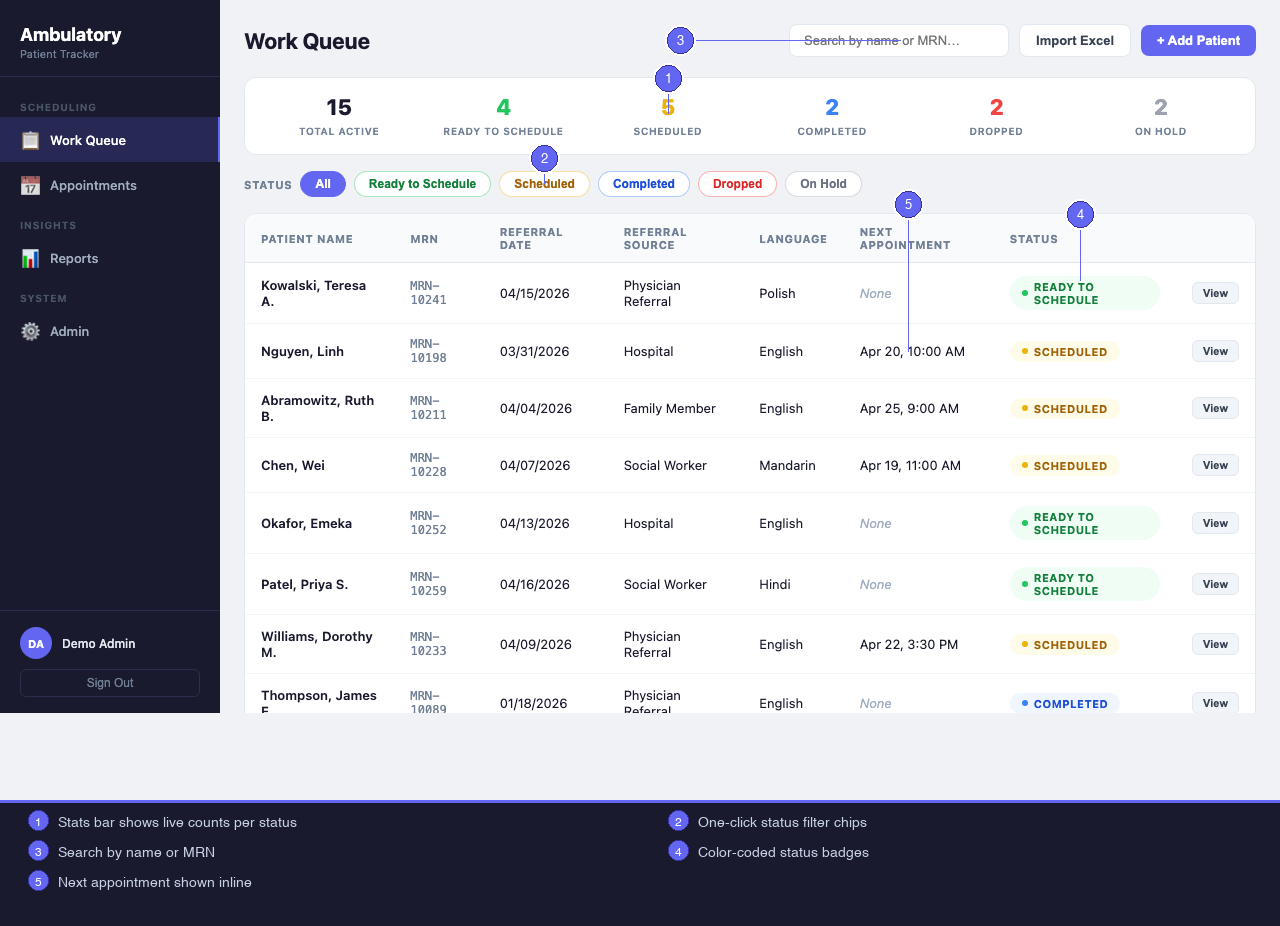
Scheduling Coordinators (1–3 staff) are the primary users. They track active caseloads, schedule and record appointments, monitor patients at risk of dropping, and export weekly activity reports.
Admins (2 staff) do everything coordinators do, plus manage user accounts, manage lookup values (referral sources, languages, religions, appointment types), configure data retention, and reset passwords.
IT was intentionally not a stakeholder. One of the explicit project goals was zero IT involvement for deployment or ongoing operation. The team needed to be fully self-sufficient.
Constraints
Several hard constraints shaped the product:
- Locked-down machines. Hospital Windows PCs are fully managed. Users cannot install software, run installers, or change system settings.
- No shared server. No budget or IT approval path for a database server, web server, or cloud service. Data must live on the user's machine or a shared drive.
- Small team, small data. The system will never have more than a few hundred active patients. A distributed database or sync protocol would be engineering for its own sake.
- Existing Excel workflows. Coordinators were already maintaining patient data in spreadsheets. Without a credible import path, adoption would stall at a cold start.
- No Epic API access. Integration with Epic would require IT involvement, vendor agreements, and a maintenance commitment. It was deferred: the system is a parallel record, not a synchronized one.
Solution: Two Deployments, One Data Model
"No software installation" had two viable interpretations:
- Electron app: a self-contained
.exethat bundles its own runtime. Copy and run. No install. - Excel workbook: a
.xlsmfile any machine with Excel can open. No runtime at all.
The design committed to both, with an identical data model behind each. This maximized deployment coverage:
| Scenario | Solution |
|---|---|
| Standard hospital PC with nothing installed | Electron .exe |
Machine where running an .exe is also blocked |
Excel workbook |
| Coordinator who prefers to stay in Excel | Excel workbook |
| Export data for archiving | Either; both write .xlsx |
The Excel workbook is a full-feature alternative, not a simplified fallback.
Product Decisions
Local-first: the file is the database
Both solutions make the file itself the database. The Electron app uses SQLite (a single .db file in %APPDATA%). The Excel workbook stores all data in hidden sheets inside the .xlsm file. Backup is copying a file. There is no server to maintain.
The tradeoff: multi-user access requires the file on a shared drive with only one person open at a time. That is acceptable for a small, coordinated team.
Admin-managed accounts, no self-registration
Coordinators cannot create their own accounts. An admin creates accounts and sets initial passwords. This is stricter than typical software, but the team is small, turnover is low, and the patient data warrants access control.
Unrestricted status transitions with a full audit trail
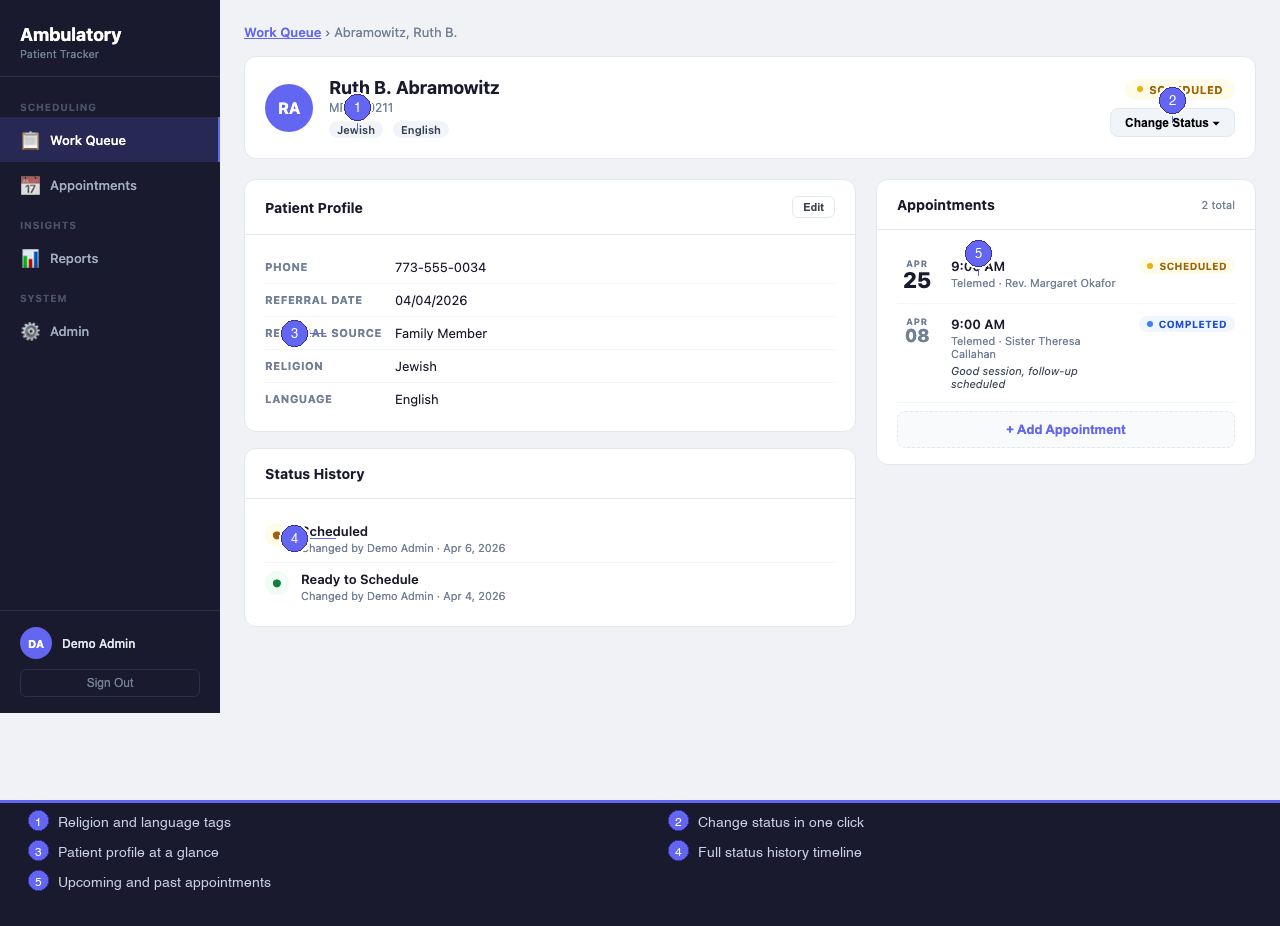
Patient statuses (Ready to Schedule, Scheduled, Completed, Dropped, On Hold) can move in any direction. Early design considered restricting certain transitions, but coordinators sometimes re-engage completed patients or reverse an incorrect status change. Rather than build workflow rules that would generate support requests, every transition is allowed and every one is recorded: who changed it, to what, and when. The audit trail does the work that rigid rules would have done.
Import path for existing spreadsheets treated as v1, not a future enhancement
Coordinators had years of patient data in personal Excel files. The Electron app includes a column-mapping import UI that reads an existing workbook, lets the user map columns to the system's fields, previews the result, and bulk-inserts. The Excel workbook has a corresponding import module. Shipping without this would have meant a cold start and slow adoption.
Archive before delete
The data retention design requires an explicit admin action before any deletion occurs. The admin sets a retention period (6, 12, 18, or 24 months) and a purge frequency. When a purge runs, stale patients are exported to a dated archive .xlsx at a path the admin picks, then hard-deleted. The admin must confirm; declining does not update the last-purge date. The team always has an archival record before anything is removed.
No Epic integration in v1
Syncing with Epic would require IT involvement, an EHR vendor agreement, a maintenance commitment, and a new failure mode: the tracking system breaking whenever Epic changes its API. The team's actual need was a record that persists through Epic's behavior, not one that depends on it. Tight integration would reintroduce the dependency they were trying to escape.
Technical Notes
Pure-VBA SHA-256
The Excel workbook needs password hashing. Calling .NET's cryptography layer via COM or using a third-party library both introduce dependencies that could break on a locked-down machine. A pure-VBA SHA-256 was written from scratch. Zero external dependencies; the workbook is self-contained.
HashRouter instead of BrowserRouter
The Electron app uses React + Vite. React Router's default behavior assumes a web server to handle deep-link paths. On a hospital PC, the app runs at file:// with no server behind it. Switching to HashRouter (routes in the URL fragment) was a one-line change that made deep linking work on every machine.
Hidden sheets as a relational database
The Excel workbook stores all data in sheets users never see. Each sheet is one table, headers in row 1, auto-incrementing integer IDs in column A, integer foreign keys between sheets. The column names match the SQLite schema exactly, which means a future migration from the Excel workbook to the Electron app requires no data transformation.
Session state lives only in memory
Both solutions store the authenticated session (user ID, name, role) in memory and never write it to disk. Closing the file clears the session. On a shared hospital PC, an unattended open file should not leave an active session behind.
Feature Comparison
| Feature | Electron App | Excel Workbook |
|---|---|---|
| Patient work queue with status filters | Yes | Yes |
| Patient detail with status history | Yes | Yes |
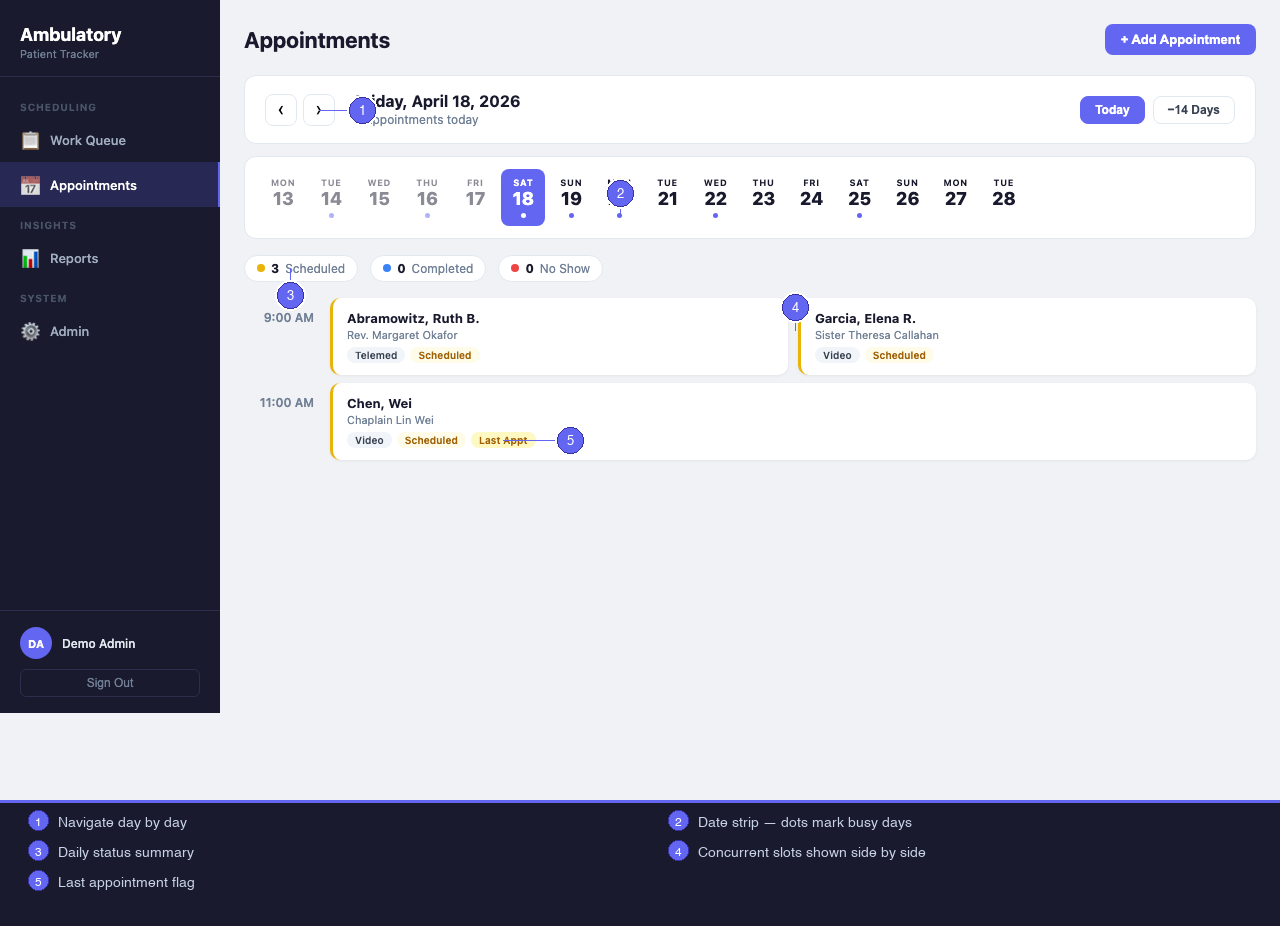
| Appointments day view | Yes | Yes |
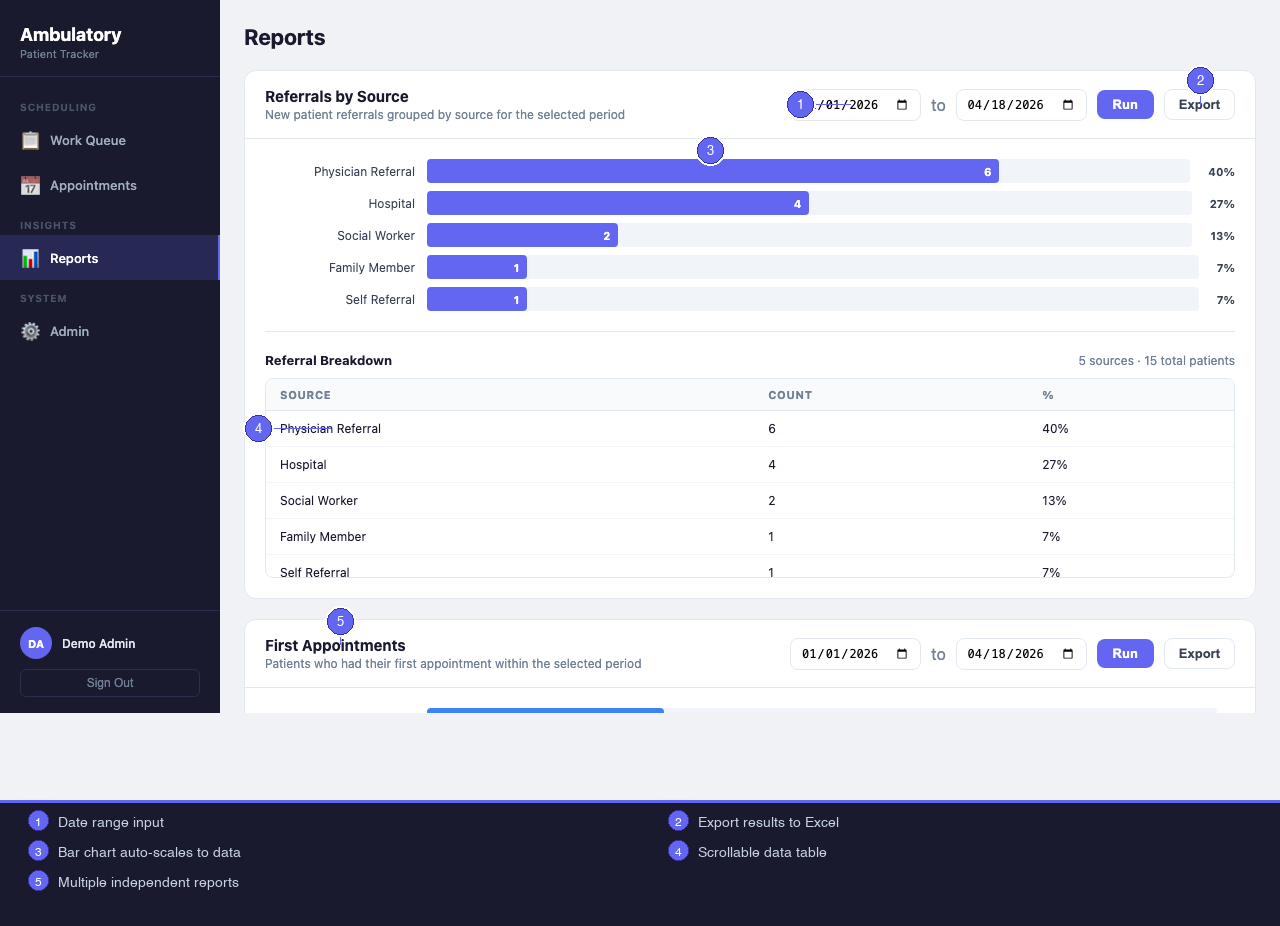
| Reports (referrals, first appointments, drops) | Yes | Yes |
| User management (admin) | Yes | Yes |
| List of Values management | Yes | Yes |
| Data retention and purge | Yes | Yes |
| Import from existing coordinator spreadsheet | Yes | Yes |
Export to .xlsx | Yes | Yes |
| Drag-to-reorder LoVs | Yes | Integer sort_order only |
| Password field masking on login | Yes | Not available (Excel cells) |
| Epic integration | Out of scope v1 | Out of scope v1 |
Application Screenshots
All screenshots are from the Electron app.
Outcome
The system gives the team a fully auditable, locally-hosted patient tracking workflow that requires no IT involvement, no server, and no installation. It works on any machine they are likely to encounter. Patient data is preserved independently of Epic's behavior. Reports export to .xlsx the way the team already works. The whole thing is maintained by copying a file and backed up the same way.
The locked-down hospital PC constraint drove every architecture decision, and the result is a system that is simpler and more reliable for it.